



PrestaShop: Tax, Profit and Stock Under Control
Connect PrestaShop and see what you really earn, after advertising, payment fees and shipping. Tax and stock alongside Amazon, whether you sell to consumers or businesses.
From revenue to real profit, order by order
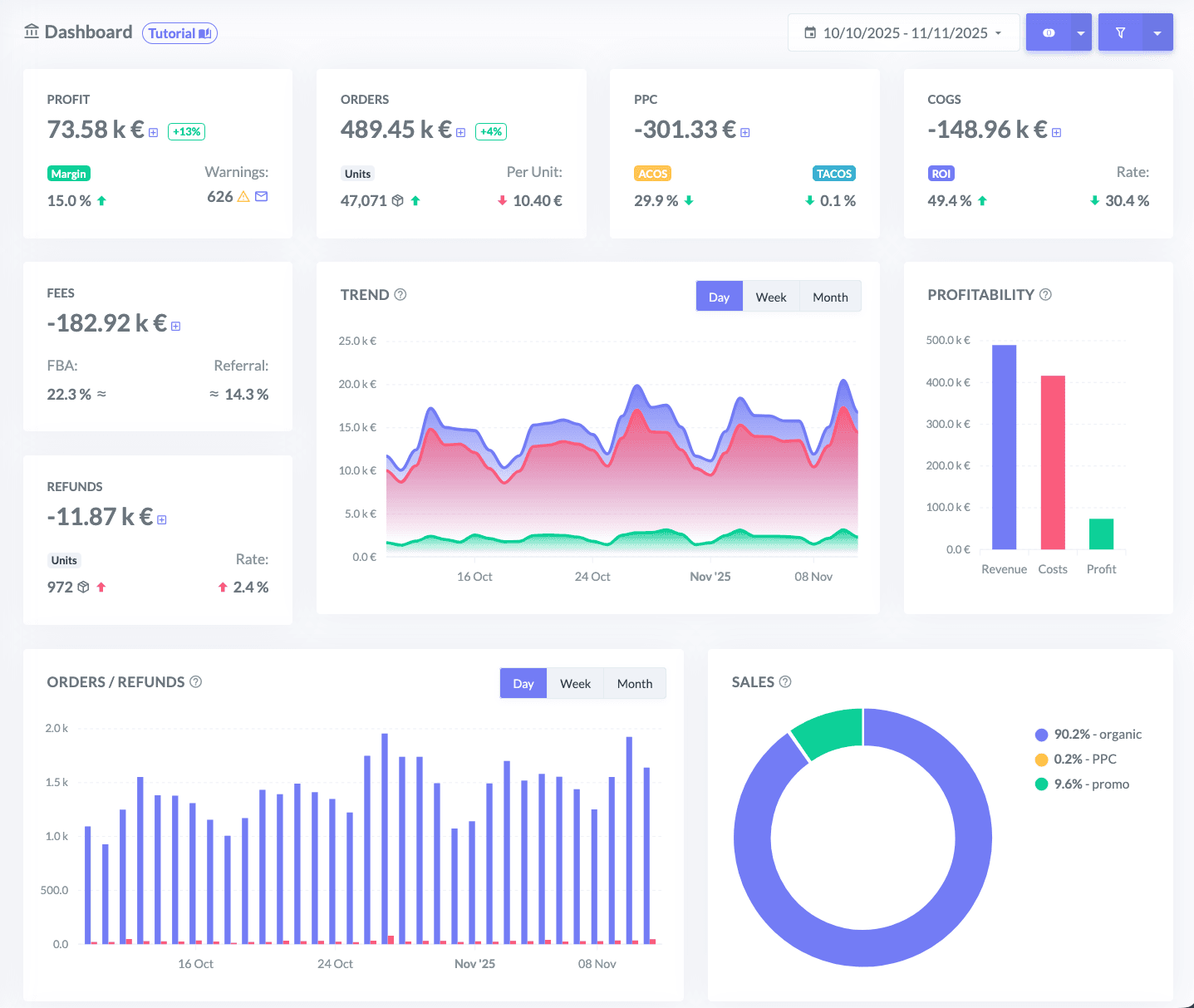
An order paid is not yet an order earned. ZonWizard deducts advertising, payment fees, shipping and refunds from every PrestaShop sale and shows you which products and markets really carry your store.
The products that make you money
Tell apart the items that bring margin from those that only bring revenue, country by country.
Campaigns measured on profit
Connect Google Ads and Meta Ads: ad spend goes into your numbers and you see which campaigns really pay for themselves.
Payment costs already deducted
Payment provider fees are already taken out of the margin of every order, with no separate calculations.
One inventory with Amazon
Stock goes down with PrestaShop and Amazon orders together, so you never sell goods you don't have.
With PrestaShop you sell across Europe. The bookkeeping is still on you.
PrestaShop calculates VAT, but it does not pay it for you or prepare your OSS return. ZonWizard puts consumer sales, B2B invoices and stock shared with Amazon in order, and shows you what you really earn.
Revenue grows, margin doesn't
Google and Meta advertising, payment fees, shipping and refunds: every order loses part of its profit, and it's hard to see it all in one place. By connecting PrestaShop, Google Ads and Meta Ads, ZonWizard gives you a complete view of your real profit, with ad spend already deducted.
Explore the Profit ToolVAT report
VAT report
VAT report
VAT report
Consumers and businesses, two different VAT rules
You sell to consumers with VAT included in the price, which PrestaShop calculates with the tax rules you have set up but which you then have to remit. You invoice businesses in other EU countries without VAT, and a single mistake throws your numbers off. ZonWizard checks the rate on your consumer sales, records your daily takings and, for B2B invoices with a VAT number verified on VIES, correctly recalculates net amount and VAT.
Explore the Accounting ToolThe more countries you reach, the sooner you hit the threshold
With PrestaShop you can sell across Europe in multiple languages and currencies. But distance sales to consumers in other EU countries add up with Amazon and your other channels towards the OSS threshold. ZonWizard monitors it across every platform together and generates a single OSS report.
Explore the Accounting ToolOne warehouse, two channels selling
If you sell the same items on PrestaShop and Amazon, every order on one channel reduces stock for the other too. ZonWizard merges your products into a single inventory, even if you use different SKUs, and bases reorders on your combined sales velocity.
Explore the Inventory ToolPrestaShop, Amazon and all your other channels in one view
In ZonWizard your PrestaShop data doesn't live in a silo: it is aggregated with Amazon, Shopify, TikTok Shop, eBay and WooCommerce using the same logic. Analyze your business as a whole and, with a single filter, isolate any channel to compare its margins and performance.
Connect PrestaShop in 3 steps
Create your account
Start your ZonWizard free trial, no credit card required.
Connect PrestaShop
Authorize access to your shop from the integrations section in a few clicks.
Find your data
ZonWizard imports orders and costs and keeps them updated automatically, together with your other channels.
PrestaShop FAQ
Can't find the answer you're looking for? Contact us and our team of experts will get back to you as soon as possible.
Who remits VAT on PrestaShop sales?
VAT on consumer sales is paid by your customer, because it is included in the price, but remitting it to the tax authority is up to you. PrestaShop is your store's software, not a marketplace: it calculates VAT at checkout with the tax rules you set up, but it does not declare or remit it on your behalf. ZonWizard checks the rate on every order and prepares the reports for your returns.
I sell to businesses in other EU countries: how do I handle invoices without VAT?
Do PrestaShop sales count towards the OSS threshold?
How are PrestaShop sales recorded in my books?
Can I include Google Ads and Meta Ads in my profit calculation?
I use different SKUs on Amazon and PrestaShop: can I have a single inventory?
Can I analyze PrestaShop separately from Amazon?
Ready to transform your business?
Start your free 30-day trial today, setup takes just a few minutes. No credit card required, cancel anytime.
Start Free TrialLearn MoreI have reduced the time I spend on doing my accounting, and improved my sales performance thanks to ZonWizard’s clear analysis.

Igor Sabetti
Amazon Seller